

This is an Early Access feature. To enable it for your account, contact your MoEngage Customer Success Manager (CSM) or the Support team.
Introduction
Campaign Insights Agent is a conversational AI assistant built directly into the MoEngage campaign analytics page. It allows you to analyze campaign performance, diagnose delivery issues, and receive actionable recommendations using simple, natural-language queries. Instead of manually navigating through stats tables and comparing metrics, you can ask the agent questions like “Why is the click rate low?” or “How did this campaign perform compared to past campaigns?” and receive a detailed, contextualized response within seconds. The agent supports multi-turn conversations, so you can ask follow-up questions to drill deeper into any area of your campaign’s performance.How the Agent Works
The Campaign Insights Agent does not rely on generic advice. Every recommendation it provides is grounded in your workspace’s actual campaign data, historical performance, and campaign-specific context.Workspace-Aware Analysis
When you open the agent, it already has access to the campaign you are viewing and the broader context of your workspace:- Your performance baselines: The agent compares the current campaign’s metrics against historical performance within your workspace — not industry-wide averages.
- Your campaign history: When you ask the agent to find winning patterns or compare past campaigns, it retrieves and analyzes campaigns from your workspace to identify strategies that have specifically worked for your audience.
- Your delivery configuration: Recommendations around frequency capping, DND settings, and send timing are based on your workspace’s actual configuration.
Campaign-Specific Recommendations
The agent tailors its analysis to the specific campaign you are viewing:- Campaign theme and content: The agent reads the actual content of your campaign — subject lines, message copy, HTML templates, and A/B variations.
- Channel and delivery context: The agent understands whether the campaign is an Email or Push notification, one-time, periodic, or event-triggered, and adjusts its analysis accordingly.
- Audience and targeting: The agent evaluates the audience that was targeted and the segments that responded, surfacing insights specific to how your users engaged with this particular campaign.
Deep Analysis with Specialized Agents
For complex queries, the Campaign Insights Agent delegates to specialized agents that focus on specific types of analysis:
This delegation happens automatically based on the complexity of your query. You do not need to select or configure these agents.
Supported Campaigns
Campaign Insights Agent is currently available for the following campaign types:Access Campaign Insights Agent
To access the Campaign Insights Agent, perform the following steps:- Navigate to the campaign analytics page for any one-time, periodic, or event-triggered Push or Email campaign.
- If campaign stats exist for the selected time range, a promotional banner appears on the page describing the AI-powered insights capability. There are two invocation points available on the campaign analytics page.
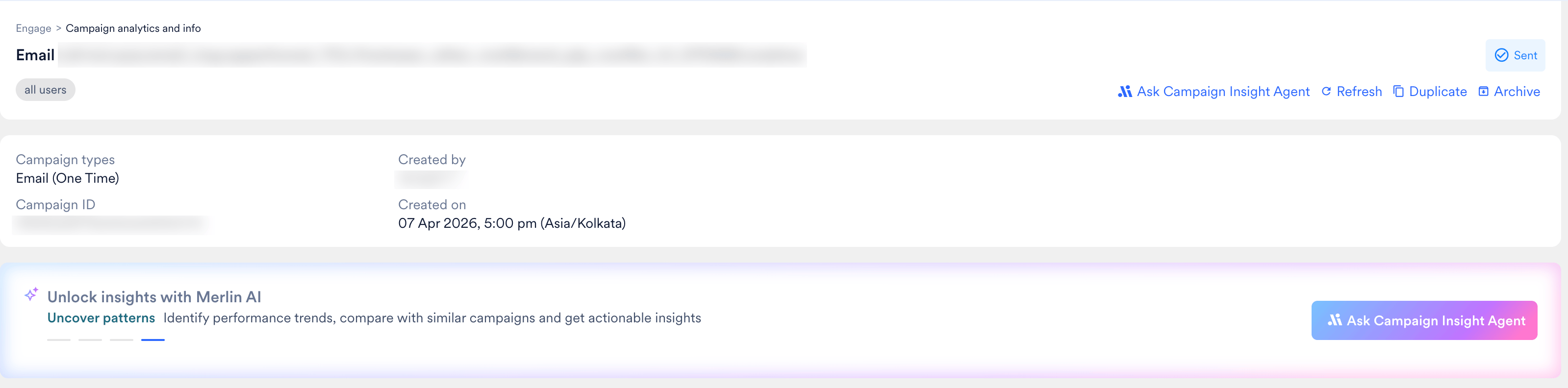
- Click the banner or the dedicated button to open the Insights Agent. A chat interface opens with five pre-built suggested prompts.
The Campaign Insights Agent entry point is only visible when the campaign has stats available for the selected time range. If the campaign is on hold, scheduled, or has no recorded stats, the agent will not appear.
Use the Campaign Insights Agent
Select a Suggested Prompt
When you open the agent, it offers five pre-built prompts designed to cover the most common analysis needs. The specific prompts shown depend on the campaign’s delivery type; one-time and periodic campaigns share one set, while event-triggered campaigns get a set tailored to the trigger funnel. Both sets are available for Email and Push channels. Select any prompt to begin your analysis immediately. One-Time and Periodic Campaigns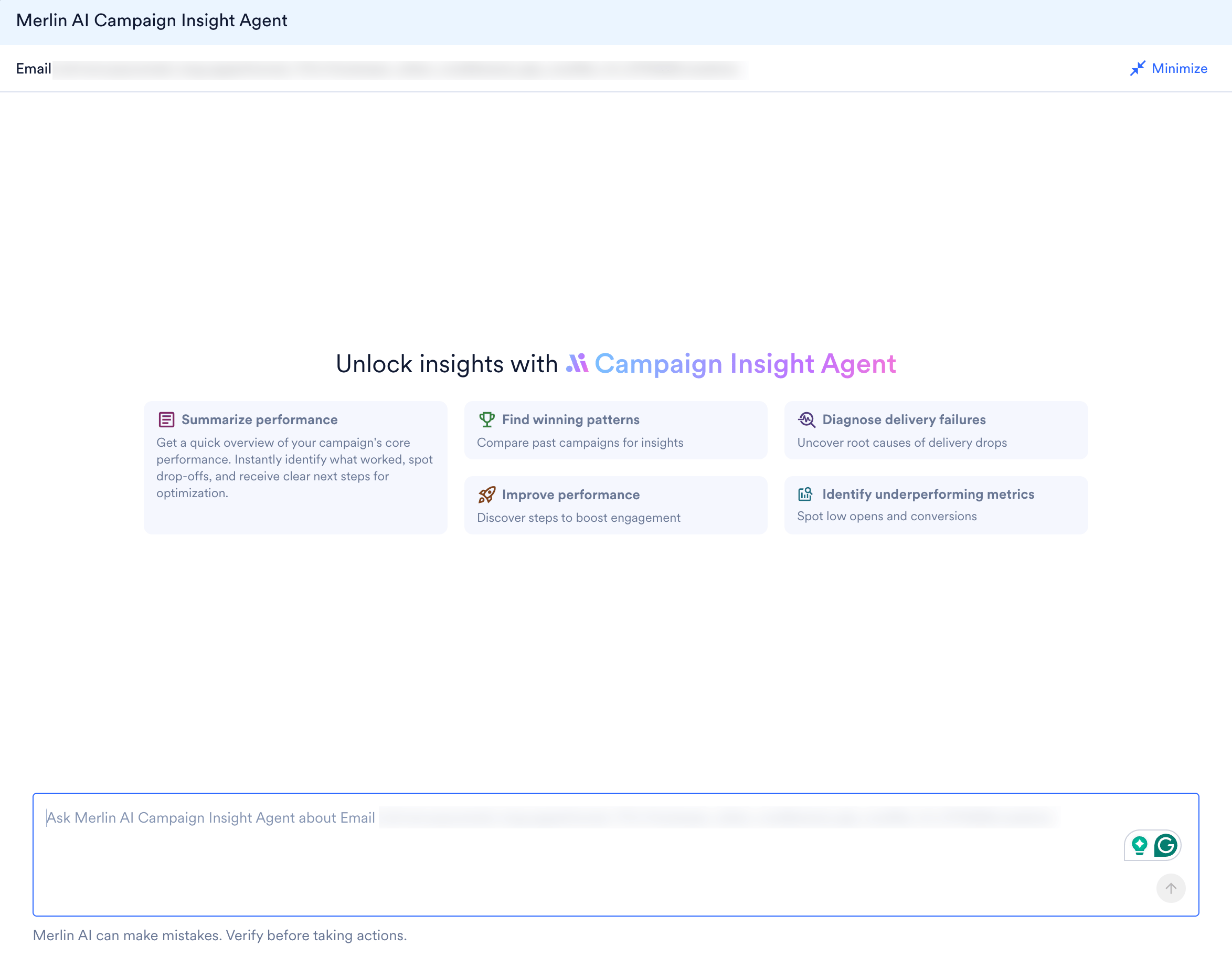
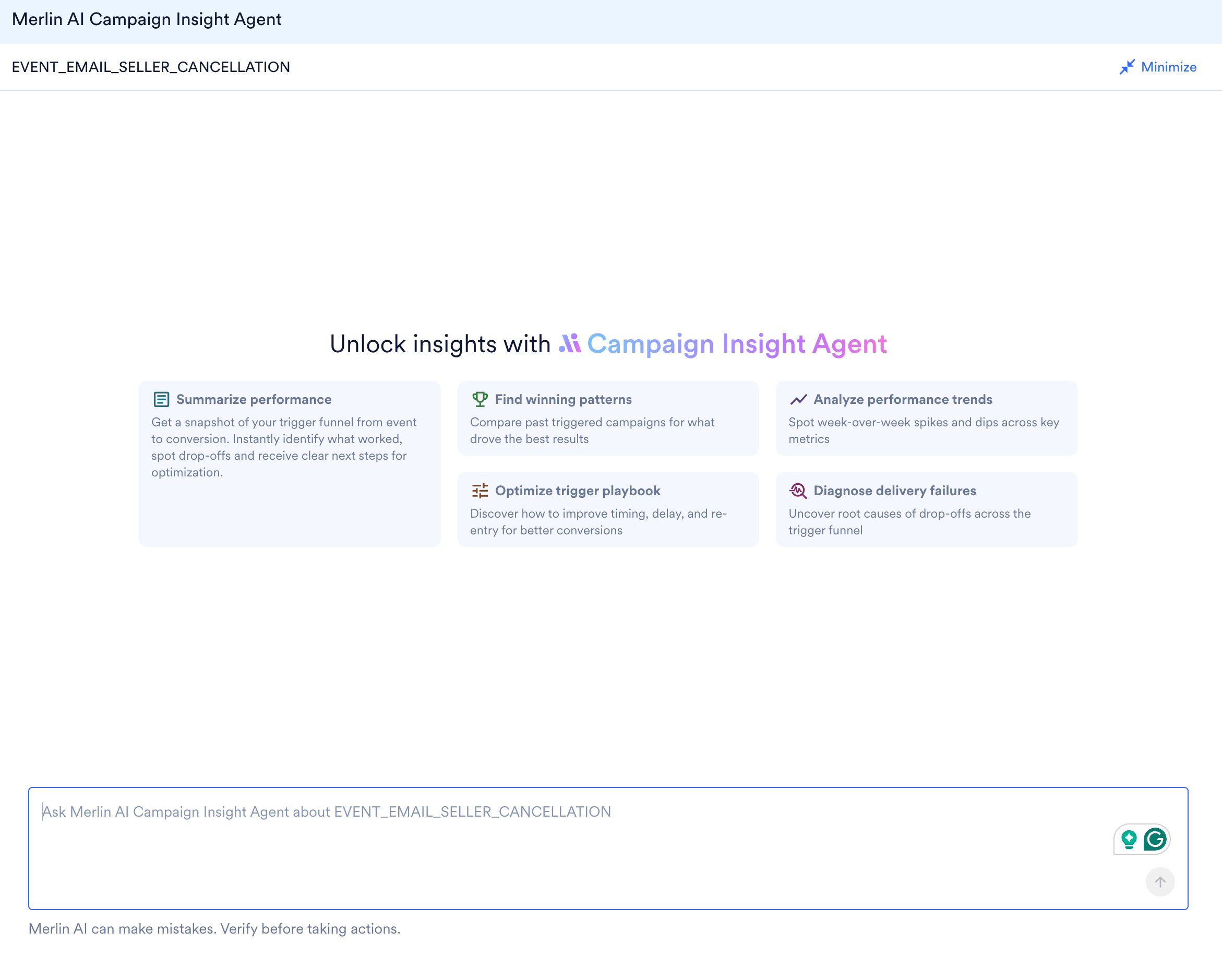
Event-Triggered Campaigns
For event-triggered campaigns, the agent surfaces a set of prompts focused on the trigger funnel, from the triggering event through to conversion, and on the timing, delay, and re-entry settings unique to triggered flows.
Write a Custom Query
If the suggested prompts do not cover your question, you can type your own natural-language query in the text input field. The agent can answer a wide range of questions about your campaign’s performance, delivery, content, and audience.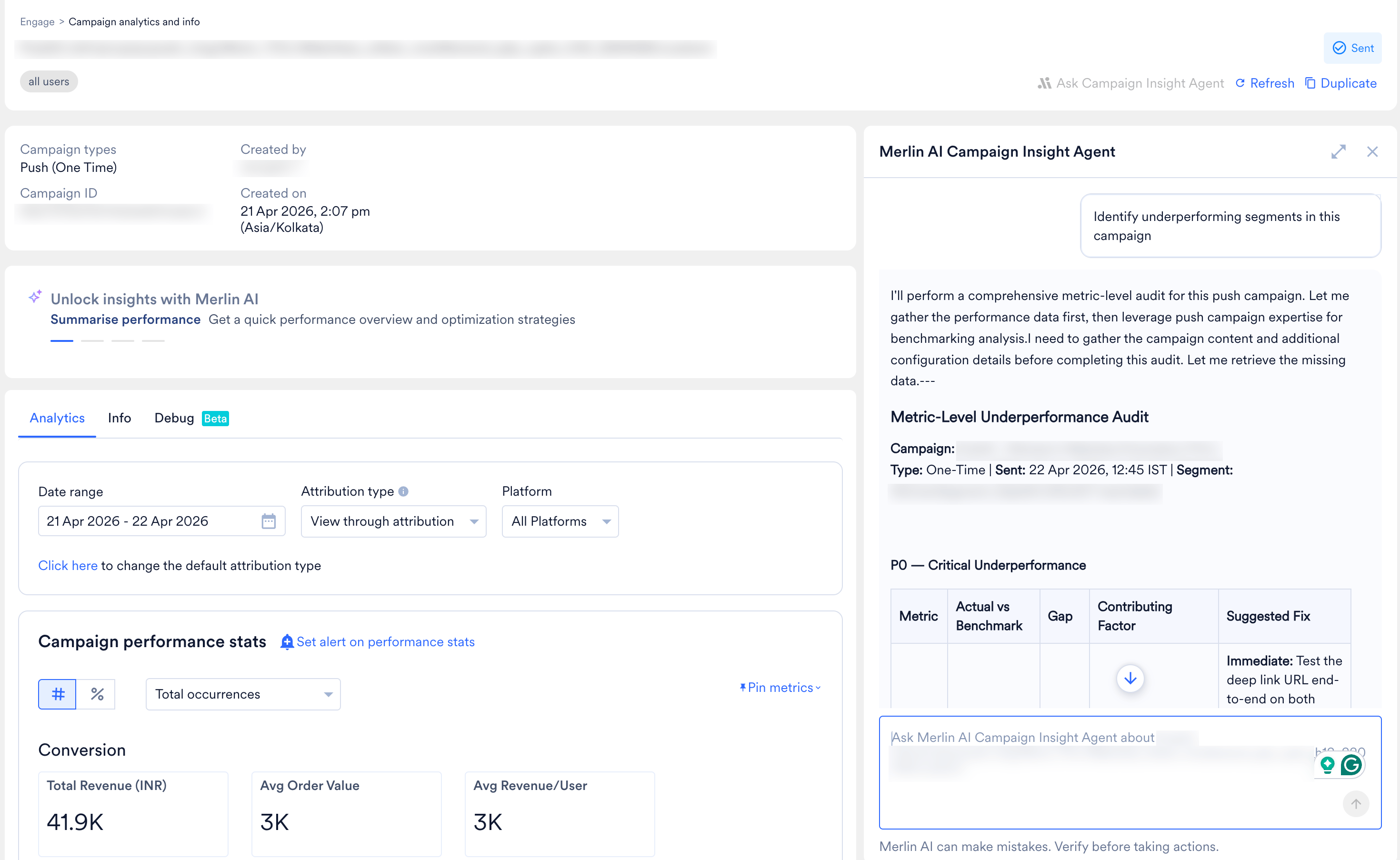
Example Queries
Here are some examples of custom queries you can ask:Conversation Features
The Campaign Insights Agent supports the following conversation capabilities: Streaming Responses Responses appear progressively as the agent processes your query. You can start reading the analysis before the full response is complete. Multi-Turn Conversations The agent maintains your full conversation history within the session. You can ask follow-up questions without repeating the context. For example, after asking about delivery performance, you can follow up with “Why is the bounce rate higher than average?” and the agent will understand the context from your previous query. Conversations are retained indefinitely. You can close the agent and return later to continue where you left off. Each conversation is user-specific; your conversation on a campaign is private to you and is not visible to other users viewing the same campaign. AI-Generated Follow-Up Questions After each response, the agent may suggest contextual follow-up questions as clickable prompts. These follow-ups are generated based on the analysis and help you take the logical next step in your investigationFollow-up suggestions are conditional. The agent only shows them when a relevant next step exists. Not every response will include follow-up suggestions.
What the Agent Analyzes
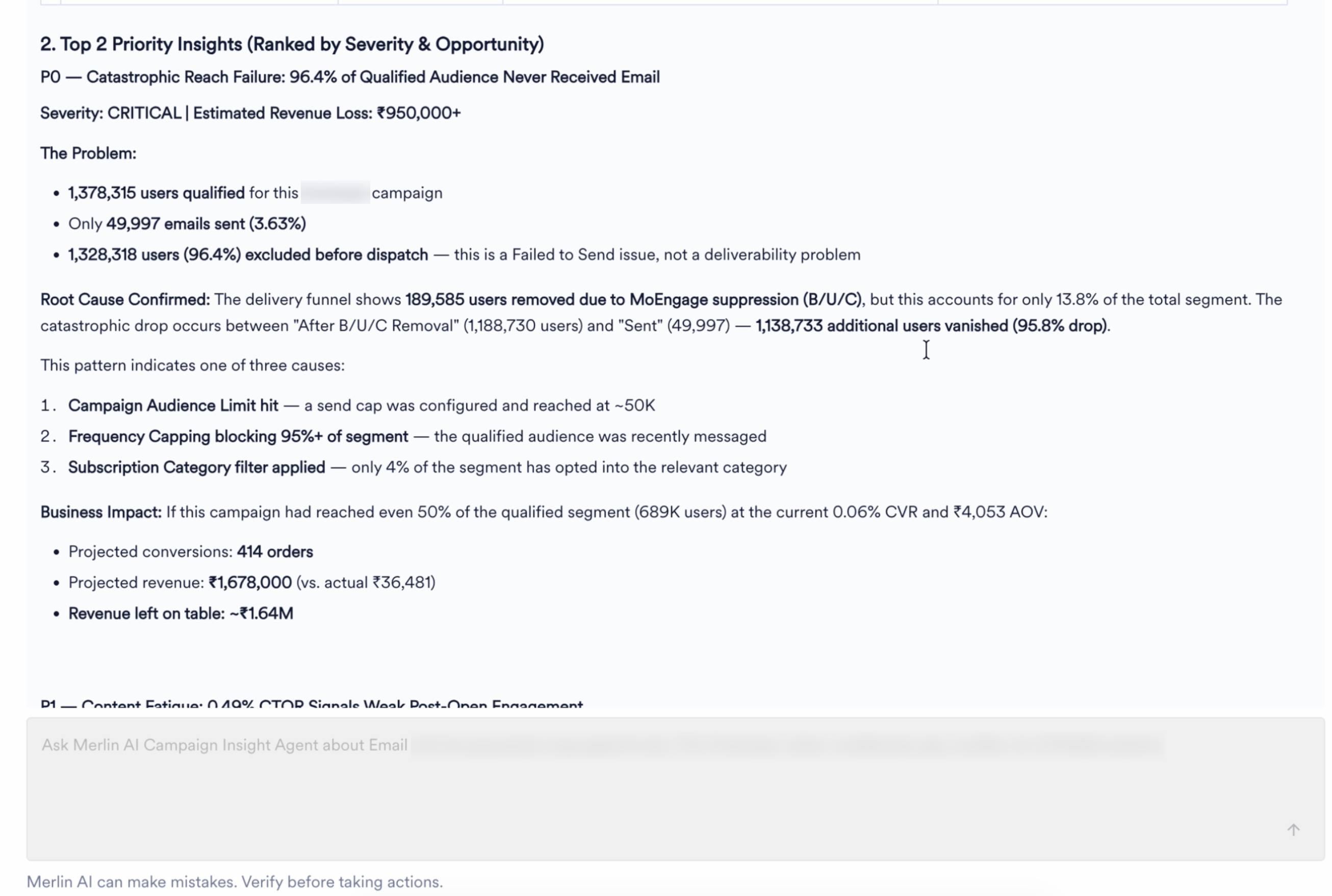
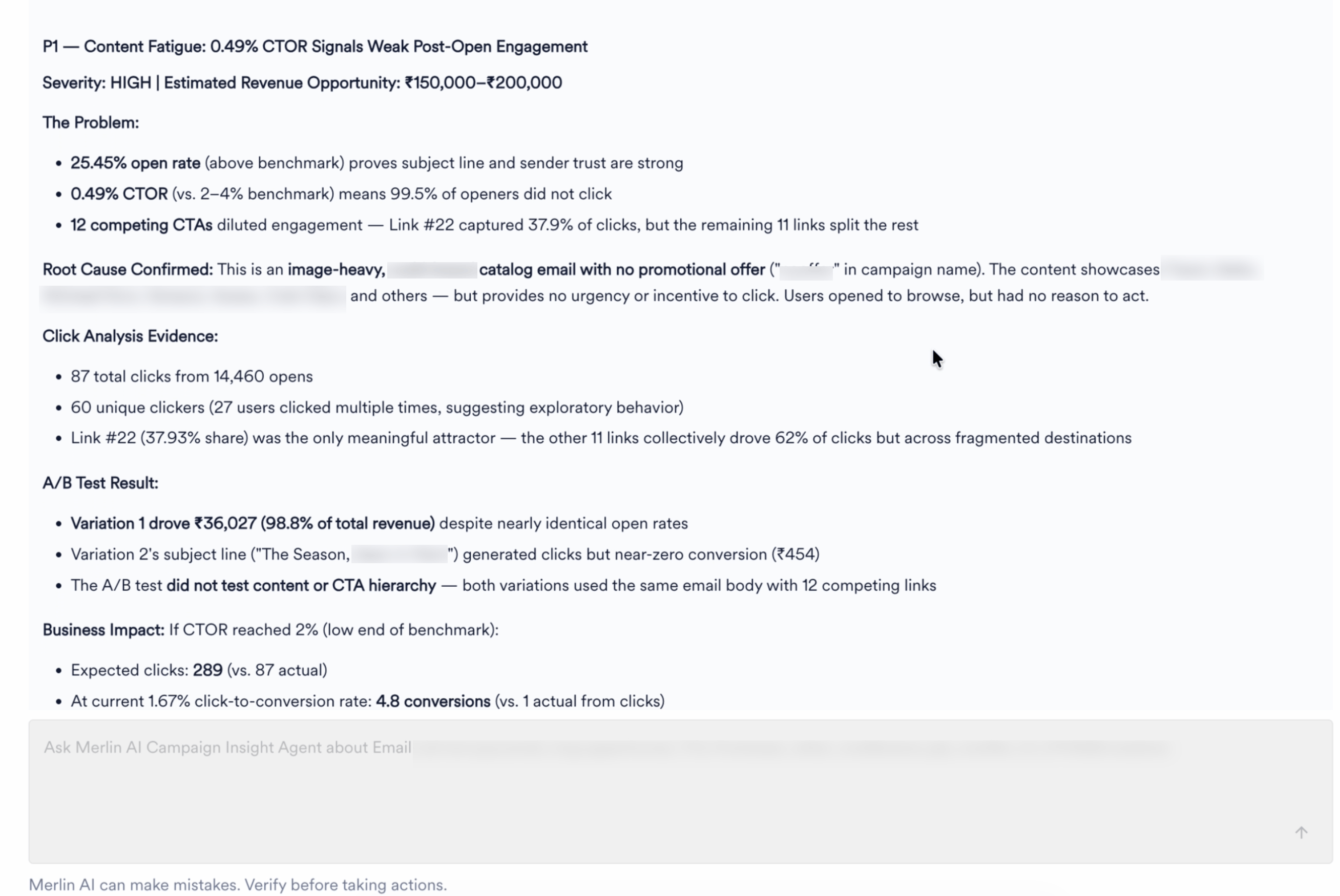
The Campaign Insights Agent has access to your campaign data across the following dimensions: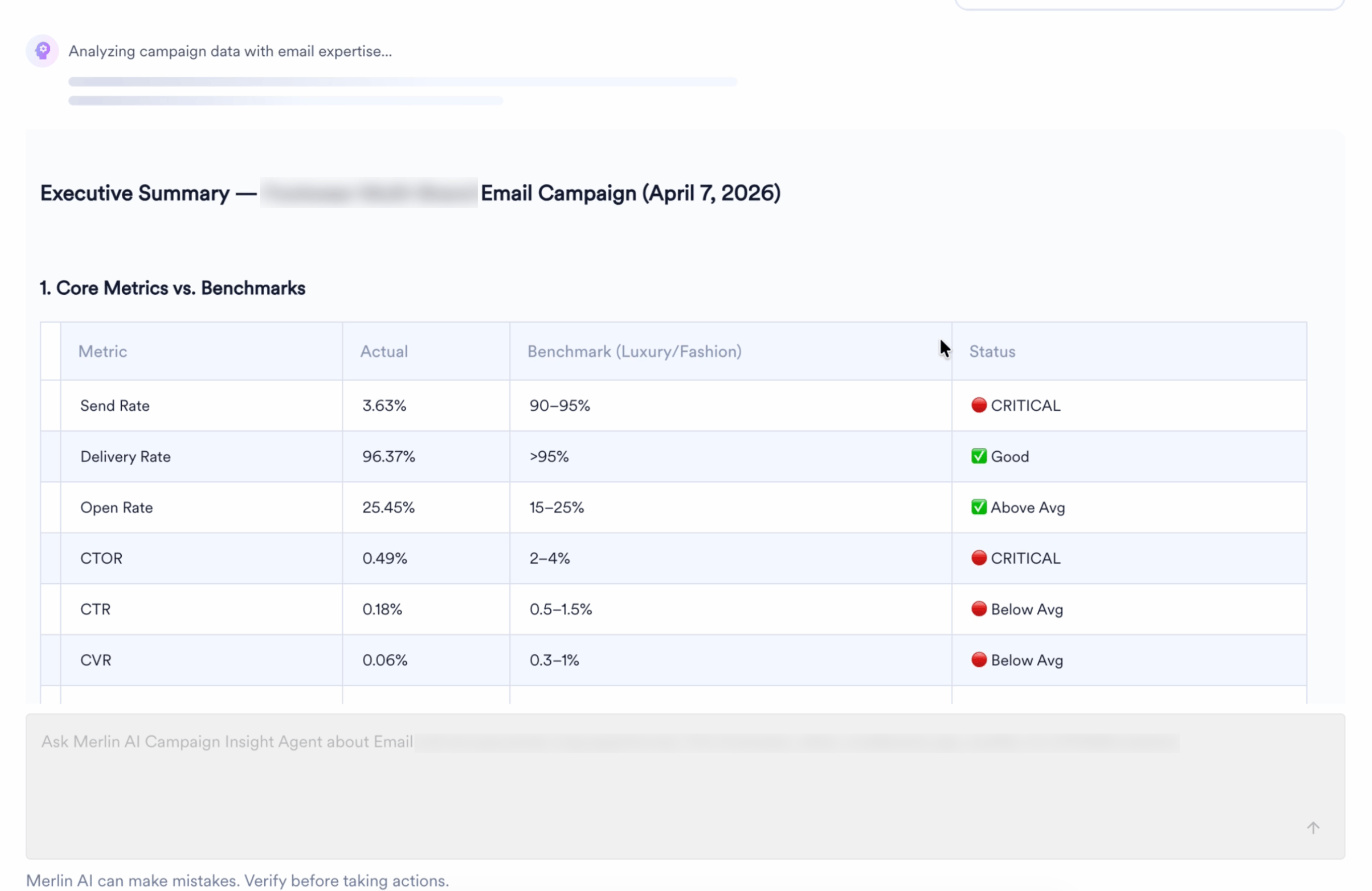
Frequently Asked Questions
Where can I find the Campaign Insights Agent?
Where can I find the Campaign Insights Agent?
The Campaign Insights Agent is available on the campaign analytics page for one-time, periodic, and event-triggered Email and Push campaigns. Look for the promotional banner that appears when stats are available for the selected time range.
Can I ask follow-up questions?
Can I ask follow-up questions?
Yes. The agent maintains your full conversation history within the session. You can ask as many follow-up questions as needed, and the agent will use the context from your prior queries.
What channels does the agent support?
What channels does the agent support?
The agent currently supports Email and Push campaigns with one-time, periodic, and event-triggered delivery types. Support for additional channels and delivery types will be added in future releases.
Can the agent modify my campaigns?
Can the agent modify my campaigns?
No. The Campaign Insights Agent provides read-only access to your campaign data. It can analyze performance, diagnose issues, and provide recommendations, but it cannot create, edit, or delete campaigns.
Why don't I see the agent on my campaign analytics page?
Why don't I see the agent on my campaign analytics page?
The agent entry point only appears when the campaign has stats for the selected time range. If the campaign is on hold, scheduled, or has no recorded stats, the agent will not be visible. Additionally, this is an Early Access feature and must be enabled for your account by your CSM or the Support team.
Can the agent access data from other workspaces or tenants?
Can the agent access data from other workspaces or tenants?
No. The agent is strictly scoped to the workspace you are authenticated into. Tenant isolation is enforced at the infrastructure level, and the agent cannot access data from any other workspace regardless of the query input.
Is there a limit on the date range I can query?
Is there a limit on the date range I can query?
Yes. Analytics queries support a maximum date range of 30 days per request.
What happens to my conversation when I close the agent?
What happens to my conversation when I close the agent?
Conversations are retained indefinitely. You can close the agent and return later to continue where you left off.
Can I ask questions about a different campaign?
Can I ask questions about a different campaign?
The agent is scoped to the campaign you are currently viewing. You cannot ask standalone questions about a different campaign’s metrics, for example, asking for the delivery rate of another campaign while on this one. However, you can ask comparative questions such as “Compare this campaign’s performance to my previous email campaign.”